What is YINI and Why?
YINI is a clear, human-friendly, text-based configuration format
— less verbose than JSON, simpler than YAML, and more expressive
than INI.
Designed to stay readable as files grow, with explicit structure
and predictable parsing.
✨ The simple idea
YINI combines the familiar simplicity of INI with structured
values similar to JSON, explicit section markers for nesting,
and parser modes for flexible editing or stricter validation.
- INI → simple
key = value - JSON → useful types such as arrays, objects,
booleans, and numbers
- Headings → clear section markers such as
^, ^^, and ^^^ - Parser modes → lenient for everyday editing,
strict when stronger validation is needed
That's YINI — familiar, readable, structured, and practical to
validate.
🧯 Why does YINI exist?
Many configuration formats are useful, but each comes with trade-offs
when files are written and maintained by humans:
- INI is simple, but often too flat.
YINI keeps key = value, but adds
nested sections.
- JSON is explicit, but punctuation-heavy to edit
by hand.
YINI keeps structured values with less required
punctuation.
- YAML is flexible, but indentation can affect
meaning.
YINI uses section markers instead of whitespace to
define structure.
- XML is structured, but verbose for configuration.
YINI supports hierarchy without opening and closing
tags.
- TOML is configuration-oriented, but deeply nested
tables can become harder to scan.
YINI makes nesting visible through repeated section
markers.
YINI is designed as a practical middle ground: familiar
configuration syntax, explicit nested sections, useful data
types, indentation-insensitive structure, and predictable
parsing rules.
The goal is not to replace every configuration format. YINI is
intentionally JSON-friendly: JSON remains a strong choice for
APIs, generated output, data exchange, and many existing tools.
YINI focuses on human-authored configuration, and the CLI can
convert YINI files to JSON when JSON is the better format for
the next step.
It is especially suitable for local or internal settings/config
files where you want a clear, predictable file that people can
understand and hand-edit safely.
✨ What makes YINI different?
- Clear structure without indentation rules
No fragile whitespace semantics.
- Readable nesting that scales
Files remain easy to scan even when large.
- Predictable parsing
Defined by a formal grammar and spec.
- Human-first design
Comments, consistency, and low syntax noise.
💡 Use YINI in practice
Use YINI in real projects with practical tools for parsing,
validation, and conversion.
Lenient by default. Strict when needed.
YINI parsers are expected to use lenient mode by default. The strict mode is optional and intended for
cases where stronger validation is needed.
- Lenient mode — for everyday editing.
- Strict mode — for validation, robustness, and
CI.
- Same format — different parser behavior.
Lenient and strict mode are parser choices, not separate
versions of the format.
The format is fully defined by the YINI specification.
This allows YINI to remain human-friendly by default, while
still supporting stricter validation when needed.
⚖️ Quick comparison
JSON vs YINI
JSON can become harder to read and maintain as files grow.
YINI allows comments directly in the file and uses explicit
section markers for structure.
Show JSON and YINI examples
JSON:
{
  "Service": {
    "id": "aurora-gateway",
    "environment": "prod",
    "Limits": {
      "requestsPerMinute": 1200,
      "burst": 60,
      "maxBodyKb": 512
    },
    "Webhooks": {
      "enabled": true,
      "targets": [
        {
          "name": "alerts",
          "url": "https://hooks.example.com/alerts",
          "secret": "****"
        },
        {
          "name": "billing",
          "url": "https://hooks.example.com/billing",
          "secret": "****"
        }
      ]
    },
    "_comment": "JSON can't do comments; people add fields like this (or separate docs)."
  }
}
Here is the same config in YINI
YINI:
/* Aurora Gateway service configuration (human-edited) */

^ Service
id          = "aurora-gateway"
environment = "prod"

^^ Limits
requestsPerMinute = 1200
burst             = 60
maxBodyKb         = 512

^^ Webhooks
enabled = true

targets = [
  { name: "alerts",  url: "https://hooks.example.com/alerts",  secret: "****" },
  { name: "billing", url: "https://hooks.example.com/billing", secret: "****" }
]
YAML vs YINI
YAML can be sensitive to indentation and whitespace mistakes.
YINI uses explicit section markers instead of indentation to
define hierarchy.
Show YAML and YINI examples
YAML:
# One stray indent (whitespace) changes the structure

app:
  name: My App
  server:
    host: 127.0.0.1
    port: 8080
   allowedOrigins:   # <- off by one indent (hard to spot)
    - https://myapp.com
    - "http://localhost:3000"
Here is the same config in YINI
YINI:
# Structure is defined by markers; indentation is optional

^ App
name = "My App"

^^ Server
host = "127.0.0.1"
port = 8080
allowedOrigins = ["https://myapp.com", "http://localhost:3000"]
Point: In YINI the hierarchy is signaled by
markers, not whitespace.
XML vs YINI
XML can represent structured configuration with elements and
attributes. This example uses nested elements; YINI expresses
the same settings with key-value pairs and section markers.
Show XML and YINI examples
XML:
<Service>
    <id>aurora-gateway</id>
    <environment>prod</environment>
    <Limits>
        <requestsPerMinute>1200</requestsPerMinute>
        <burst>60</burst>
        <maxBodyKb>512</maxBodyKb>
    </Limits>
</Service>
YINI:
^ Service
id = "aurora-gateway"
environment = "prod"

^^ Limits
requestsPerMinute = 1200
burst = 60
maxBodyKb = 512
TOML vs YINI
Both formats support comments and structured configuration. TOML
names nested tables with dotted paths; YINI uses repeated
section markers to show nesting depth.
Show TOML and YINI examples
TOML:
[Service]
id = "aurora-gateway"
environment = "prod"

[Service.Limits]
requestsPerMinute = 1200
burst = 60
maxBodyKb = 512
YINI:
^ Service
id = "aurora-gateway"
environment = "prod"

^^ Limits
requestsPerMinute = 1200
burst = 60
maxBodyKb = 512
🧪 Real example
YINI code:
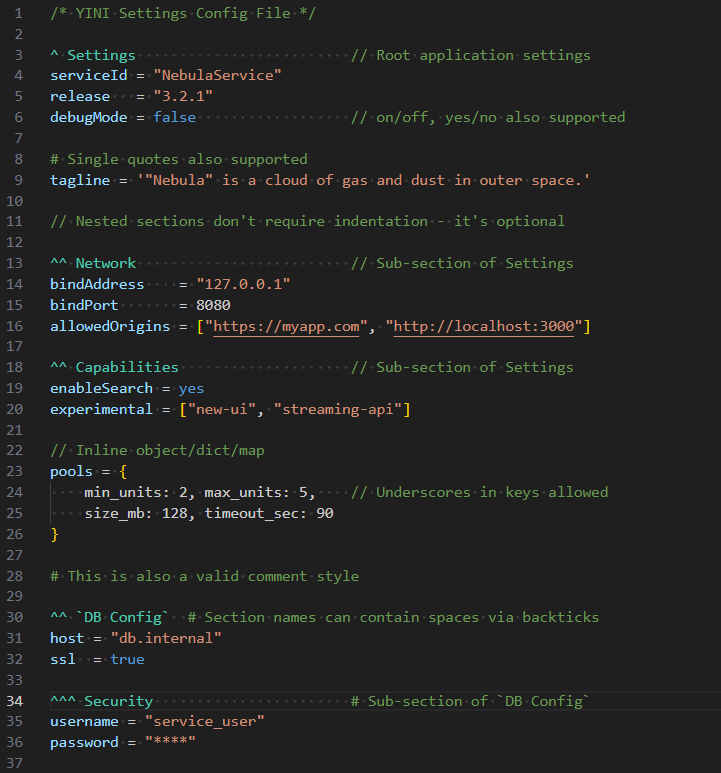 Source file: settings.yini
This example uses features from the official YINI specification.
Show parsed JSON
{
    "Settings": {
        "serviceId": "NebulaService",
        "release": "3.2.1",
        "debugMode": false,
        "tagline": ""Nebula" is a cloud of gas and dust in outer space.",
        "Network": {
            "bindAddress": "127.0.0.1",
            "bindPort": 8080,
            "allowedOrigins": [
                "https://myapp.com",
                "http://localhost:3000"
            ]
        },
        "Capabilities": {
            "enableSearch": true,
            "experimental": [
                "new-ui",
                "streaming-api"
            ],
            "pools": {
                "min_units": 2,
                "max_units": 5,
                "size_mb": 128,
                "timeout_sec": 90
            }
        },
        "DB Config": {
            "host": "db.internal",
            "ssl": true,
            "Security": {
                "username": "service_user",
                "password": "****"
            }
        }
    }
}
New to YINI? Read a short learn the YINI format.
🔭 Next steps
YINI is open-source and actively maintained.

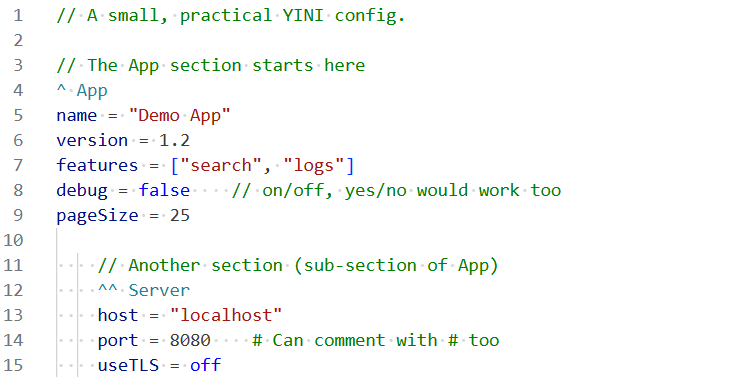 Source file: basic.yini