
YINI — A Predictable Format for Real-World Configs
YINI is a human-friendly, INI-inspired text-based configuration format for software projects: readable like INI, structured like JSON, without YAML's surprises. It offers clear nesting, comments, and predictable parsing, so your configuration stays easy to read and reason about as it grows. Suitable for configuration files, application settings, and general data storage.
Example of YINI code:
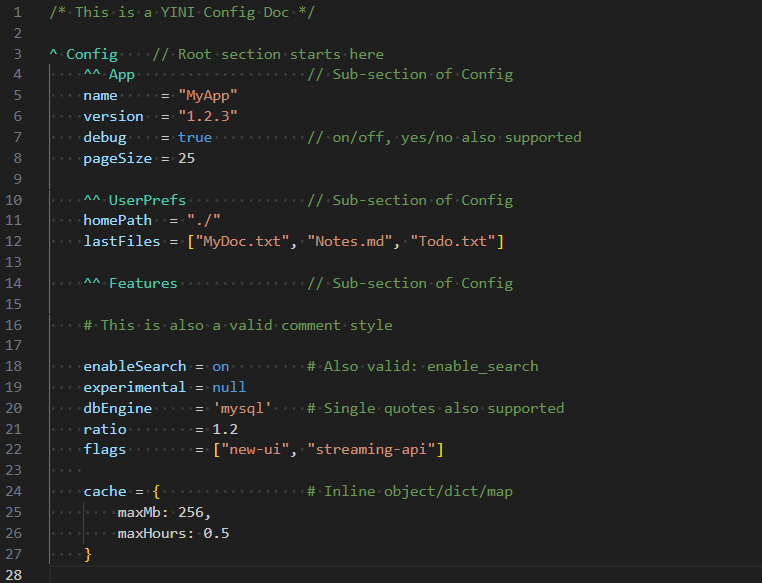 Source file: config.yini
How YINI is used in practice
Use YINI wherever you need structured configuration — without the usual complexity.
-
🛠 Validate and convert YINI files from the command line
with the YINI CLI tool.
It can export parsed data as JSON, YAML, XML, or JavaScript.
- 📦 Load YINI directly in TypeScript/JavaScript applications with the YINI Parser for TypeScript.
- 🐍 Load YINI directly in Python scripts, tools, and applications with the YINI Parser for Python.
- 🔧 Load YINI directly in Go applications and tools with the YINI Parser for Go (Alpha).
- 🧩 Use YINI for configuration files, data files, tooling, and CI workflows.
🌐 The YINI Ecosystem
A high-level overview of the main YINI specification, tooling, implementation, and adoption pieces.
View detailed project status
| 🧠 Core | 🛠 Implementation | 🌍 Adoption |
|---|---|---|
| ✔ Language Specification (RC) | | |
| ✔ Parsing Rules (Lenient & Strict) (RC) | ✔ TypeScript Parser (Primary) | |
| ✔ Formal Grammar (ANTLR) (RC) | ✔ CLI Tool (Parse & Convert YINI) | ✔ Homepage & Docs |
| | ✔ Cheat Sheet (Quick Syntax Guide) | |
| | ✔ YINI Test Suite / Parser Compatibility Tests | ✔ Example Projects |
| | ✔ Python Parser (RC) | |
| | |
Who is YINI for?
YINI configuration files are a good fit for:
- Local or internal settings/config files where you want a clear, predictable file that people can understand and hand-edit safely.
- Developers who want readable, structured configuration without relying on indentation-sensitive syntax.
- Teams that want comments, useful data types, and nested sections without JSON workarounds or flat INI-style sections.
- Projects that benefit from predictable parsing in tools, CI, and application configuration.
YINI is early-stage: tooling is growing, community is small — However the specification is in release-candidate state, and the official parsers, CLI, and test suite are suitable to try in projects where you control the stack.
Real YINI configuration used by this site
This site uses site-config.yini as a real YINI configuration
file in the yini-homepage repository.
During the build workflow, yini-cli converts it to JSON:
npx yini-cli@latest parse site-config.yini --output src/config/site-config.json
This generates src/config/site-config.json, which
is read by
config.ts and used by this Astro site.
Repository: github.com/YINI-lang/yini-homepage
📝 Example
YINI code:
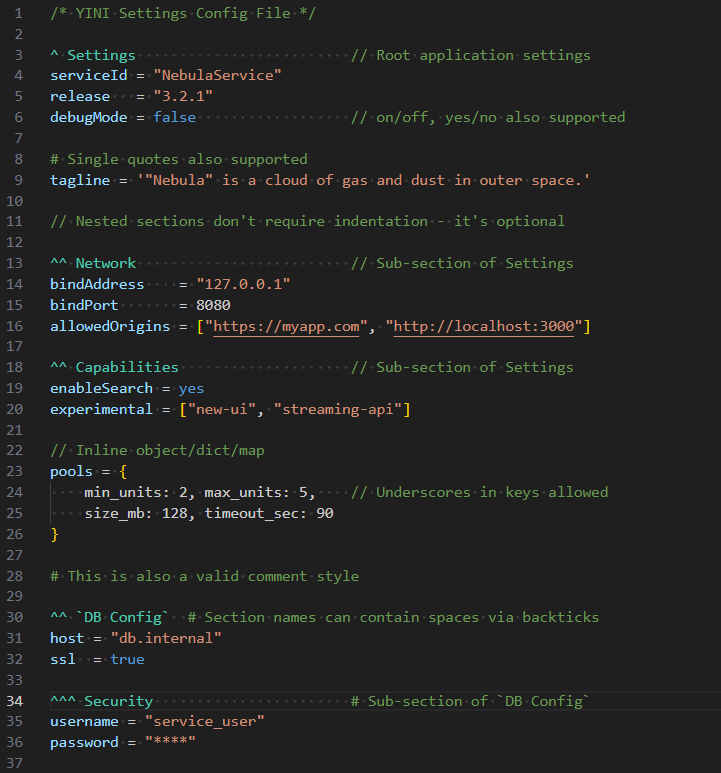 Source file: settings.yini
Show parsed JSON
{
    "Settings": {
        "serviceId": "NebulaService",
        "release": "3.2.1",
        "debugMode": false,
        "tagline": ""Nebula" is a cloud of gas and dust in outer space.",
        "Network": {
            "bindAddress": "127.0.0.1",
            "bindPort": 8080,
            "allowedOrigins": [
                "https://myapp.com",
                "http://localhost:3000"
            ]
        },
        "Capabilities": {
            "enableSearch": true,
            "experimental": [
                "new-ui",
                "streaming-api"
            ],
            "pools": {
                "min_units": 2,
                "max_units": 5,
                "size_mb": 128,
                "timeout_sec": 90
            }
        },
        "DB Config": {
            "host": "db.internal",
            "ssl": true,
            "Security": {
                "username": "service_user",
                "password": "****"
            }
        }
    }
}
New to YINI? Read a short learn the YINI format.